
What Is the Difference Between an LCD and an OLED Screen?

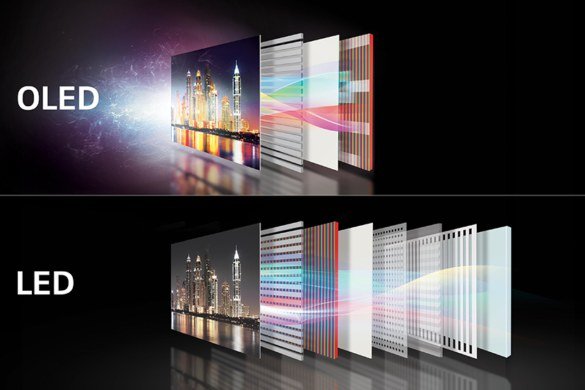
So what is the difference between an LCD and an OLED screen? Put simply: an LCD shines one big backlight through liquid crystals, while an OLED lets every single pixel make its own light — and switch fully off. That one design difference explains nearly everything about how the two look, how much power they use, and why OLED phones cost more.
I used to think this was spec-sheet trivia. Then I watched the same movie on my old LCD phone and my wife’s OLED one, side by side, in a dark room. The difference in the night scenes wasn’t subtle — it was the difference between grayish murk and actual black. That sold me, but OLED isn’t better at everything, as you’ll see.
What Is the Difference Between an LCD and an OLED Screen, Really?
An LCD (liquid crystal display) works like a window with shutters: a white backlight is always on, and liquid crystals twist to block or pass that light for each pixel. Because the backlight never fully turns off, true black is impossible — the darkest an LCD can show is a very dark gray.
An OLED (organic light-emitting diode) has no backlight at all. Each pixel is its own tiny lamp, so a black pixel is simply off. No light, no glow, no compromise. You can read the technical details on Apple's official iPhone repair pricing if you want the deep physics, but that self-emissive design is the whole story in one sentence.
Picture Quality: Contrast, Color, and Brightness
OLED wins contrast by a mile — infinite contrast ratios versus roughly 1,500:1 on a good LCD. Colors on OLED tend to look richer and more saturated, which makes photos and movies pop. Blacks are genuinely black, so dark scenes in shows look dramatically better.
LCD fights back on brightness. High-end LCDs can sustain searing brightness across the whole screen without breaking a sweat, which is why many budget and mid-range TVs still use LCD panels — they’re fantastic in bright living rooms. LCDs also tend to show more accurate, less oversaturated color out of the box, which some photographers actually prefer. If your TV picture looks off, by the way, it might not be the panel type at all — see why Why is the picture on my new TV too dark in movie mode.
Quick cheat sheet if you're comparing two specific models in a store:
- Check black levels: play a dark scene — OLED shows true black, LCD shows dark gray.
- Test brightness: crank it to max under store lights — LCD often looks punchier here.
- Look at viewing angles: move off to the side — cheap LCDs wash out, OLED and good LCDs hold up.
- Ask about the panel in writing: marketing names like QLED and Crystal UHD are still LCD underneath.
- Consider your habits: heavy dark-mode user? OLED saves battery. Static content all day? LCD is worry-free.
Battery Life and Burn-In: The Real Trade-Offs
Here’s where it gets interesting. OLED only sips power for dark pixels, so dark mode genuinely extends battery life on OLED phones — sometimes noticeably. But show a full-white screen and OLED can actually use more power than LCD. LCD’s backlight draws roughly the same power no matter what’s displayed.
OLED’s famous weakness is burn-in: static images left on screen for thousands of hours can leave a faint ghost. Modern phones fight this with pixel shifting and automatic dimming, and for normal use — even heavy use — it takes years to appear. Still, if you keep phones for five-plus years or leave navigation on screen all day for work, it’s worth knowing about. This is one reason many buyers still weigh Is it worth paying extra for a 4K TV or is HD enough carefully instead of defaulting to OLED.
Which Should You Pick for Your Next Phone or TV?
For phones, OLED has effectively won the flagship tier — the contrast and power savings with dark mode are too good to give up. But a good LCD on a mid-range phone is nothing to be embarrassed about; it’s often brighter outdoors and cheaper to replace if it cracks.
For TVs it depends on your room. Dark home theater? OLED, no contest. Bright living room with lots of windows and kids who leave cartoons paused? A quality LCD (often sold as QLED or Mini-LED) will make you happier and cost less. Match the technology to your actual life, not the spec sheet.
The Takeaway
What Is the Difference Between an LCD and an OLED Screen? What Buyers Get Wrong
The biggest mistake is judging screens in the store. Retail demo modes crank brightness and saturation to cartoonish levels specifically to grab your eye under fluorescent lights — every TV looks amazing and nothing looks accurate. If you’re comparing seriously, ask to switch to Movie or Cinema mode and play something dark; that’s where LCD’s gray blacks and OLED’s true blacks actually reveal themselves. The store wants you impressed; you want informed.
People also overthink burn-in and underthink brightness. Burn-in on modern OLEDs takes years of static content to matter for normal use — it’s a non-issue for movie watchers and a real consideration only for news-channel-all-day or taskbar-always users. Meanwhile brightness gets ignored: that gorgeous OLED in a sun-drenched living room will look washed out next to a bright LCD. Match the panel to your room first, your content second, and the spec sheet last.
If you’re buying a monitor rather than a TV or phone, the calculus shifts again. For desk work — spreadsheets, coding, writing — a good IPS LCD is often the better choice: no burn-in risk from static taskbars and windows, usually cheaper at 27 inches and up, and text rendering that many people find sharper. OLED monitors are spectacular for gaming and creative work but demand burn-in precautions like hiding the taskbar. Match the panel to the use case: static desktop work favors LCD, cinematic and gaming use favors OLED, and there’s no wrong answer once you know your own habits.
OLED gives you perfect blacks, stunning contrast, and better battery life with dark content; LCD gives you higher sustained brightness, zero burn-in risk, and lower prices. Neither is universally better — the right choice is the one that fits your room, your habits, and your budget.
My practical rule after years of this: visit a friend with each type, watch something you know well, in lighting like yours. Ten minutes of real viewing beats ten hours of spec comparison. The right screen is the one that looks right in your room, showing your content — everything else is marketing.
[…] than any resolution bump ever will. If you’re also choosing a display for close-up use, our What is the difference between an LCD and an OLED screen LCD-vs-OLED breakdown covers the panel technology […]
[…] doesn’t match what it was designed for. This is also why the panel technology matters — our What is the difference between an LCD and an OLED screen LCD vs OLED guide explains brightness differences between display […]