
Is It Worth Paying Extra for a 4K TV or Is HD Enough?

Is it worth paying extra for a 4K TV or is HD enough? Walk into any electronics store and the wall of glowing 4K screens screams ‘obsolete’ at your current TV. But here’s the thing the store doesn’t want you calculating: whether you can actually see the difference depends on math, not marketing — specifically, your screen size and how far you sit.
I’ve owned both, calibrated both, and watched the same films on both. The honest answer surprised me, and it’ll probably save some of you a few hundred dollars.
Is It Worth Paying Extra for a 4K TV? The Viewing-Distance Math
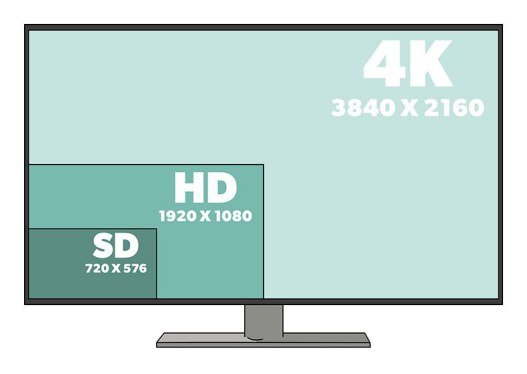
Here’s the physics: human eyes can’t resolve 4K detail beyond a certain distance. For a 55-inch TV, you need to sit within about 7 feet to see the full benefit of 4K over 1080p HD. At 10+ feet — a normal living-room distance — a 55-inch 4K and 1080p TV look essentially identical showing the same content. For a 65-inch set, the threshold stretches to about 8 feet.
So measure your couch. If you’re 9 feet from a 55-inch TV, 4K resolution is literally invisible to you — you’re paying for pixels your eyes can’t see. This is the single most useful fact in TV shopping, and salespeople never volunteer it. (Bigger screens change the math: at 75+ inches, 4K is visible from normal distances — size is what makes resolution matter.)
Resolution Isn’t the Real Upgrade (HDR Is)
Here’s the twist: the visible difference between a modern 4K TV and an old HD TV usually isn’t the resolution — it’s HDR (High Dynamic Range) and the better panels that come with it. HDR’s brighter highlights, deeper shadows, and wider colors are visible from across the room, at any screen size. It’s the actual wow factor.
This reframes the purchase: you’re not really buying pixels, you’re buying a modern panel with HDR, better processing, and smarter features. A good 4K TV with proper HDR looks dramatically better than an old HD set — just don’t credit the resolution for what HDR and panel quality did. When comparing models, prioritize HDR format support (Dolby Vision, HDR10+) and peak brightness over pixel counts. And if your current TV’s picture looks wrong, check Why is the picture on my new TV too dark in movie mode before assuming you need a new one.
The 4K decision in one glance:
- Measure your viewing distance: beyond ~7 feet on a 55-inch, 4K resolution is invisible.
- HDR matters more than resolution — it’s the visible upgrade at any distance.
- Check your content: streamers get real 4K; cable households mostly don’t.
- At 2026 prices (~$300 for 55-inch 4K), just buy 4K for the main TV — the gap is tiny.
- Spend leftover budget on sound; a soundbar beats extra pixels for movie night.
Content: The Other Half of the Equation
A 4K TV only shows 4K when fed 4K content. The good news in 2026: most of it is. Netflix, Disney+, Max, Apple TV+, and YouTube all stream extensive 4K HDR libraries; modern game consoles and Blu-ray players output 4K. If you mainly watch these services, you’ll actually use the resolution you bought.
But cable TV, most live sports broadcasts, and older content are still 720p/1080p — upscaled, not true 4K. Upscaling on good TVs is decent but it’s not magic. Be honest about your viewing diet: a household that watches 90% cable news gains almost nothing from 4K, while a movie-night family on streaming services gains a lot. Match the TV to the content, not the spec sheet.
The Price Reality in 2026
Here’s what finally settles it for most buyers: the price gap has collapsed. Decent 55-inch 4K TVs now start around $300 — barely more than HD sets, which are increasingly relegated to small bedroom sizes. At these prices, ‘is 4K worth it’ is almost moot: you’re getting 4K, HDR, and smart features for what HD alone cost five years ago.
So the practical advice: under 50 inches for a bedroom, buy whatever’s cheap — you won’t see 4K anyway. For the main living room at 55+ inches, buy 4K for the HDR and modern panel, not the pixels. And put the money you save toward sound — a $150 soundbar improves movie night more than any resolution bump ever will. If you’re also choosing a display for close-up use, our What is the difference between an LCD and an OLED screen LCD-vs-OLED breakdown covers the panel technology underneath.
The Bottom Line
Is It Worth Paying Extra for a 4K TV or Is HD Enough? What Most People Get Wrong
What most people get wrong: buying the TV for the spec sheet instead of the room. They research resolution and panel technology for weeks, then mount the TV above the fireplace — the worst viewing position in the house, causing neck strain and washed-out picture from the angle — or place it where afternoon sun hits the screen directly. A $400 TV positioned well beats a $1,200 TV positioned badly, every single time. Room, seating distance, and light control matter more than any spec.
Second mistake: ignoring audio completely. TV speakers have gotten worse as TVs got thinner — physics doesn’t negotiate — and a $150 soundbar transforms the experience more than any resolution upgrade. People will spend hours debating 4K versus 8K while listening through speakers the size of postage stamps. If your budget is $800, spend $600 on the TV and $200 on sound; you’ll enjoy it more than an $800 TV alone. The picture gets the attention, but the sound makes the movie.
If you’re wall-mounting, invest in a proper mount and take the time to get the height right — the center of the screen should be at eye level from your main seating position, which is lower than most people mount. Too high is the classic error (the fireplace mount epidemic), causing neck strain that ruins the experience regardless of picture quality. A $40 tilting mount at the right height beats a $200 full-motion mount at the wrong height. Measure twice, drill once, enjoy for years.
Buy the 4K TV — not because you’ll see every pixel, but because at today’s prices you get HDR, a better panel, and modern features for barely more than HD. Just know the truth: it’s the HDR and panel quality you’re actually seeing, the resolution matters most on big screens viewed up close, and a soundbar will improve your evenings more than any spec on the box.
Buy the 4K TV for the HDR and modern features, position it at eye level away from direct sun, sit at the right distance, and spend real money on sound. Get the room right and even a mid-range TV looks fantastic; get it wrong and no spec sheet saves you. The setup matters as much as the purchase.