
How Do I Check If My Email Was Part of a Data Breach?

How do I check if my email was part of a data breach? It’s a question worth asking, because the answer is ‘probably’ for most of us — billions of email addresses have leaked in breaches over the years, and there’s a free, legitimate tool that tells you exactly which ones touched your address.
I checked mine expecting a clean record and found six breaches, including one from a forum I’d forgotten existed. Here’s how to check yours and what to actually do about the results.
How Do I Check If My Email Was Part of a Data Breach? Use Have I Been Pwned
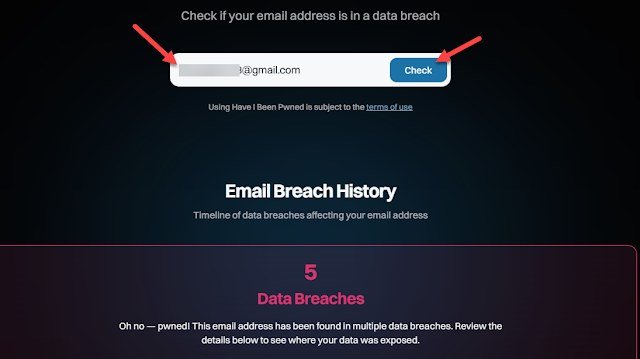
The tool is Have I Been Pwned (haveibeenpwned.com), run by security researcher Troy Hunt. It’s free, it’s been the industry standard for a decade, and it’s safe — it doesn’t store your email when you search, and it’s recommended by governments and security professionals worldwide. Type your email, and it lists every known breach containing it, with dates and what data was exposed.
Google’s Password Checkup (built into Chrome and Android) and Apple’s iCloud Keychain alerts do the same job passively — they’ll warn you when saved passwords appear in breaches. Use Have I Been Pwned for the full historical picture, and let the built-in tools guard you going forward. One caution: only use the real site or your browser’s built-in checker — copycat ‘breach checker’ sites are a phishing risk themselves.
Reading Your Results Without Panicking
Most people find at least one breach — that’s normal, not an emergency. What matters is what leaked. Email + password combos are the serious ones, because attackers try them on other sites (credential stuffing). Breaches exposing only your email address mean more spam, not account takeovers. Old breaches from a decade ago matter less if you’ve changed passwords since.
Prioritize: any breach including a password you still reuse anywhere goes to the top of the fix list. Financial or government-service breaches deserve immediate password changes. A breached newsletter signup from 2015? Note it, maybe unsubscribe, move on. Triage calmly — the goal is action, not anxiety.
Your breach-response checklist:
- Search your email at haveibeenpwned.com — free, safe, the industry standard.
- Change passwords on breached services AND everywhere you reused them.
- Enable two-factor authentication, starting with your email account.
- Freeze your credit if financial data was exposed — it’s free and powerful.
- Subscribe to breach alerts so the next one is a notification, not a surprise.
What to Do If You Were Breached
Step one: change the password on the breached service — and on every other site where you used the same password (this is the critical part; credential stuffing is automated and relentless). Step two: enable two-factor authentication on the important accounts, starting with email — our What is two-factor authentication and how do I set it up guide walks through it in five minutes per account.
Step three: if financial data was involved, watch statements for unfamiliar charges and consider a credit freeze (free, and the strongest identity-theft protection available). Step four: be extra skeptical of phishing emails referencing the breach — scammers exploit breach news with fake ‘reset your password’ emails. Verify by going to the site directly, never via email links. For ongoing credential hygiene, Is a password manager safer than writing passwords on paper explains the system that makes breaches mostly harmless.
Staying Ahead of the Next Breach
Assume breaches will keep happening — they will — and build habits that make them boring. Unique password per site (via a manager) means one breach can’t cascade. Two-factor authentication means even a leaked password isn’t enough. Fewer accounts means less exposure: delete old accounts you don’t use, especially forums and shopping sites from years ago.
Set up breach notifications: Have I Been Pwned lets you subscribe for alerts when your email appears in new breaches, and both Google and Apple notify automatically. Early warning turns a breach from a crisis into a ten-minute password change. That’s the whole game — not preventing breaches, which you can’t control, but containing them, which you absolutely can.
The Bottom Line
How Do I Check If My Email Was Part of a Data Breach? Pro Tips
Pro tip: check every email address you’ve ever used, not just your current one. Old addresses from college, previous jobs, and that embarrassing first email account are all breach candidates — and they’re often the ones tied to accounts you forgot about but never closed. Those forgotten accounts with reused passwords are exactly what credential-stuffing attacks harvest. The fifteen minutes spent checking old addresses often reveals the riskiest exposures.
Also: sign up for breach notifications rather than checking manually. Have I Been Pwned offers free alerts for your addresses, and both Google and Apple notify automatically when saved passwords appear in new breaches. Set it once and the system watches for you — future breaches become a push notification and a ten-minute password change instead of a nasty surprise discovered years later. Monitoring beats memory every time.
Create a separate email address for high-risk signups — newsletters, forums, free trials, shopping sites — and keep your primary address for banking, work, and important accounts. When the throwaway address appears in breaches (and it will), the exposure is contained: no banking, no identity documents, nothing critical. This compartmentalization is the single most effective breach-damage-limitation strategy there is, and it takes ten minutes to set up with any free email provider.
Checking takes two minutes at Have I Been Pwned, and most people will find something — that’s normal. What matters is the response: unique passwords, two-factor authentication, and breach alerts turn future leaks from emergencies into minor chores. You can’t stop breaches, but you can make them irrelevant.
Breach checking is a two-minute habit with outsized returns: check all your addresses, subscribe to alerts, and respond to hits with password changes and two-factor setup. You can’t prevent breaches, but early detection plus unique passwords makes them harmless. That’s the whole game, and it’s very winnable.