
Do I Really Need Antivirus Software on Windows Anymore?

Do I really need antivirus software on Windows anymore? Ten years ago the answer was an obvious yes. Today it’s genuinely debatable — Microsoft’s built-in Defender has grown from a joke into a genuinely competent security suite, and independent tests now rank it alongside paid products.
I’ve run Windows machines with and without third-party antivirus for years. Here’s the honest breakdown of what Defender covers, where paid products still earn their keep, and the security habits that matter more than either.
Do I Really Need Antivirus Software on Windows Anymore? What Defender Does Now
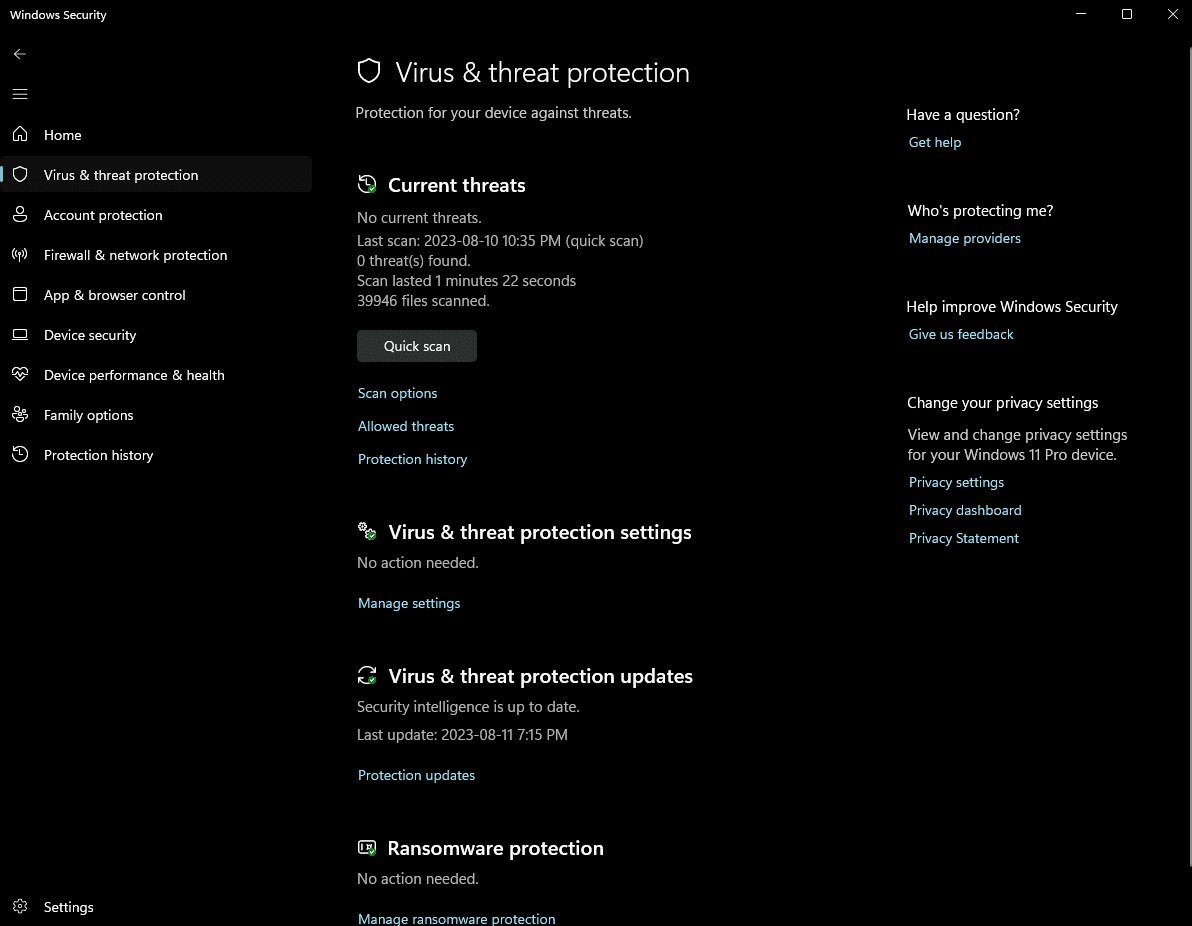
Microsoft Defender (built into Windows 10 and 11, always on by default) now includes real-time antivirus, firewall, ransomware protection (Controlled Folder Access), phishing/SmartScreen web filtering, and cloud-delivered threat intelligence. In independent AV-TEST evaluations, it consistently scores at the top for protection — matching or beating products people pay $60/year for.
For the average user — browsing, Office, streaming, Steam — Defender plus Windows Update is genuinely sufficient. It’s lightweight, doesn’t nag you with upsell popups (the true cost of ‘free’ antivirus), and can’t expire or lapse. The era when Windows shipped defenseless is long over; the baseline moved, and most advice hasn’t caught up.
When Paid Antivirus Still Makes Sense
Three situations justify paying. One: high-risk users — people who torrent, download software from sketchy sources, or fall for phishing regularly. Paid suites add behavioral analysis and stronger web filtering that catches what Defender misses. Two: identity-theft extras — some suites bundle VPNs, password managers, and dark-web monitoring that are convenient (though buyable separately and often better). Three: parental controls and multi-device management for families.
Also consider it for business or compliance contexts where ‘we run enterprise endpoint protection’ is a requirement, not a choice. But notice what’s not on the list: normal home use. If your threat model is ‘I browse the web and answer email,’ Defender is enough — spend the $60 on a password manager and an external backup drive instead; both protect you more.
The 2026 antivirus decision tree:
- Average home user (browse, Office, stream, game)? Defender alone is enough.
- High-risk downloader or frequent phishing victim? Consider a paid suite.
- Want VPN/password-manager bundles? Compare standalone prices first — often cheaper.
- Business/compliance requirements? Follow policy, not this article.
- Everyone: update promptly, back up, learn phishing — matters more than the AV brand.
What Matters More Than Your Antivirus Choice
Here’s the uncomfortable truth: antivirus — any antivirus — is the least important layer. What actually prevents infections: keeping Windows and browsers updated (most malware exploits patched vulnerabilities), not downloading sketchy executables, and recognizing phishing (the delivery method for most modern attacks — see How can I tell if a text message link is a scam for the text-message version).
Add two more: use a standard user account instead of admin for daily use (malware inherits your privileges), and keep backups — ransomware is toothless if your files are safely backed up elsewhere. Our How do I check if my email was part of a data breach breach-check guide and What is two-factor authentication and how do I set it up 2FA guide cover the account-security side. An updated, backed-up, phishing-aware user running Defender is safer than a careless user running the most expensive suite on the market.
If You Skip Third-Party AV, Do This Instead
Verify Defender is actually on: Settings > Privacy & Security > Windows Security — everything should show green. Turn on ransomware protection (Virus & threat protection > Ransomware protection > Controlled folder access) — it’s off by default and it’s excellent. Enable cloud-delivered protection and automatic sample submission for the fastest threat response.
Then build the habits: update promptly, be skeptical of downloads, use an ad-blocker (malvertising is a real infection vector), and keep regular backups. Check Windows Security monthly — green across the board means you’re fine. That’s the whole program, and it costs exactly nothing.
The Bottom Line
Do I Really Need Antivirus Software on Windows Anymore? The Fine Print
The fine print on ‘free’ antivirus: you’re often the product. Free AV tools monetize through upsell nagging, data collection, or bundled junkware — the popups alone cost more in attention than the software saves. Microsoft Defender’s real advantage isn’t just protection parity; it’s the absence of dark patterns. No nag screens, no expiring trials, no ‘your PC is at risk!’ scare tactics. That peace has genuine value.
Also fine print: no antivirus — paid or free — protects against the actual top threats anymore. Phishing, social engineering, and malicious browser extensions sail past every AV engine because they don’t look like malware; they look like you making bad decisions. The security industry quietly admits the endpoint-protection battle moved to the human layer years ago. Your skepticism about unexpected emails and downloads protects you more than any real-time scanner. Invest in backup and awareness first, AV debates second.
One more layer worth adding regardless of your antivirus decision: DNS-level filtering. Changing your DNS to a filtering provider (Quad9, Cloudflare for Families) blocks malicious domains before your browser even connects — it stops phishing sites, malware downloads, and sketchy ads at the network level, on every device in your house, for free. It takes two minutes in your router settings and protects phones, tablets, and smart TVs that can’t run antivirus at all. It’s the highest-value free security upgrade most people have never heard of.
For most Windows users in 2026, Microsoft Defender is genuinely all the antivirus you need — it’s free, top-rated, and nag-free. Paid antivirus still has a place for high-risk users and bundle-seekers, but updates, backups, and phishing awareness protect you far more than any logo in your system tray. Save your money for a backup drive.
For most Windows users, Defender plus updates plus backups plus phishing awareness is complete protection — no purchase required. Spend the antivirus budget on an external drive and a password manager instead. The threats that matter now target the user, not the operating system, and no software patch fixes that.