
Why Is My Internet Slower Than the Speed I Pay For?

Why is my internet slower than the speed I pay for? You signed up for 500 Mbps, the speed test says 180, and the provider’s support page cheerfully suggests rebooting your router. Before you assume you’re being scammed, know this: some gap between advertised and actual speed is normal — but a big gap usually has a findable cause.
I’ve been down this road twice, and both times the culprit was in my own house, not the provider’s network. Here’s how to figure out which side the problem is on — and what to do about each.
Why Is My Internet Slower Than the Speed I Pay For? Start With an Honest Test
Most speed complaints start with a bad test. For a result you can actually act on, plug a computer directly into the modem with an ethernet cable, close everything else, and run tests at speedtest.net and fast.com. Wired, quiet network, multiple tests — that’s your real number. Anything tested over Wi-Fi is testing your Wi-Fi, not your internet.
Compare that wired number to your plan. Getting 90% of advertised speed at peak hours is normal and fine. Getting 50% consistently, wired, at off-peak hours? That’s a real problem worth pursuing. Write down your numbers with timestamps — you’ll need them when you call support, because ‘it feels slow’ gets you nowhere and documented numbers get you a technician. The FCC’s guidance at the FCC's consumer help center explains what providers are actually required to deliver.
The Usual In-House Culprits
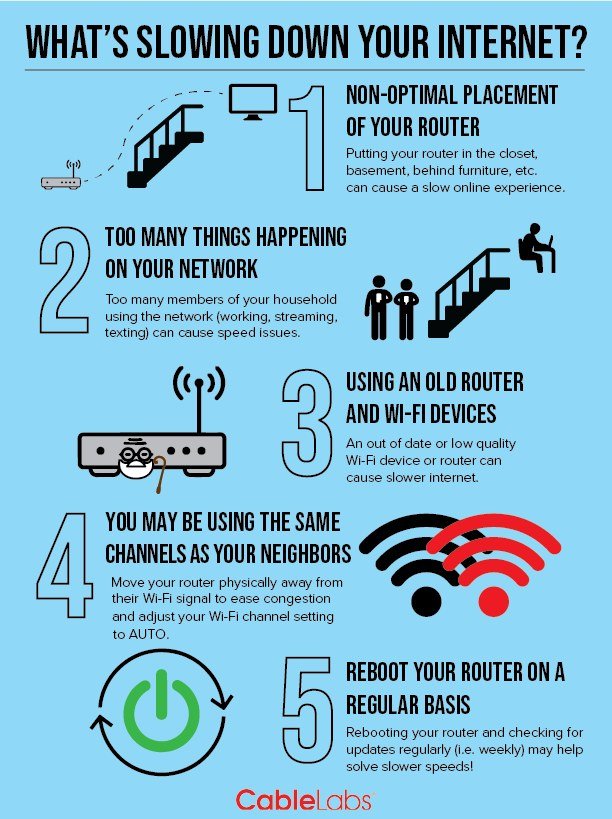
Wi-Fi is suspect number one. An old router, bad placement, or twenty devices fighting for airtime can easily halve your effective speed — and none of that is your provider’s fault. Our full guide to How can I speed up a slow WiFi connection at home walks through the fixes, but the quick version: test wired first, because if wired is fast, your internet is fine and your Wi-Fi is the project.
Suspect number two is your own network load. Cloud backups, 4K streams on three TVs, game downloads, video calls — a household can saturate even a fast connection at the wrong moment. Check what’s actually using bandwidth before blaming the provider. Suspect three: old equipment. A five-year-old modem might not support your plan’s speeds at all, and providers don’t always tell you when your rented modem is the bottleneck.
Diagnose it like a technician would:
- Test wired directly to the modem — that’s your true speed, not Wi-Fi.
- Test at different times of day for a week; evening-only slowness means congestion.
- Check that your modem actually supports your plan’s speed tier.
- Rule out your own network load and old router before calling.
- Call with documented numbers, escalate firmly, and use an FCC complaint if needed.
When the Provider Is Actually at Fault
Sometimes it really is them. Oversold neighborhood nodes slow to a crawl every evening at 7pm — the classic pattern is ‘fast at 2am, unusable at 8pm.’ Damaged lines, bad splitters, and corroded outdoor connections cause intermittent drops and speed collapse. And occasionally, billing errors mean you’re provisioned at the wrong speed tier entirely.
The tell: your wired speeds are consistently far below your plan at all hours, or they crater at the same time every evening. That’s network-side, and no router upgrade will fix it. Document a week’s worth of tests — morning, evening, late night — and you’ve got a case.
How to Get It Fixed (Without Losing Your Mind)
Call with data, not feelings: ‘I’m paying for 500 Mbps, getting 180 wired directly to the modem, tested at these times on these dates.’ Ask them to check your provisioning and line quality while you’re on the phone. If the first agent stonewalls, ask for a supervisor or a line technician visit — and get any promised credits or visits in writing via chat or email.
If they can’t fix it, you have leverage: file a complaint with the FCC at consumercomplaints.fcc.gov. Providers respond to FCC complaints fast — it’s remarkable how quickly ‘nothing we can do’ becomes a technician appointment. And if a competitor serves your address, even the credible threat of switching often brings out the retention department’s better offers.
The Bottom Line
Why Is My Internet Slower Than the Speed I Pay For? The Fine Print
Read your plan’s fine print for two gotchas: data caps and deprioritization. Many ‘unlimited’ plans throttle after a data threshold (often 1TB–1.2TB), and some budget plans deprioritize your traffic during congestion — meaning your neighbor on the premium plan gets full speed while you’re slowed, on the same network, at the same time. If your slowdowns are time-specific and your plan is the cheap tier, deprioritization might be the whole story.
Also check for the modem rental trap: that $10–$15/month modem fee adds up to $600+ over a few years for hardware worth $100. Buying your own approved modem usually pays for itself in under a year — just confirm it’s on your provider’s approved list first, because an incompatible modem is a headache. And when you call support, always ask for the ticket number and the agent’s ID; documented calls get resolved faster than undocumented ones, and the FCC complaint option exists for a reason.
Document everything before you call support, and I mean everything: wired speed test results with timestamps across several days, your modem model and its approved status, the exact plan name on your bill, and any previous ticket numbers. Support agents are dramatically more helpful when you open with data instead of frustration — ‘I’m provisioned for 500, getting 180 wired at 8pm, 9pm, and 7am across three days, modem is on your approved list’ gets you a technician, while ‘my internet is slow’ gets you a reboot script. Data is the language support speaks.
A small gap between advertised and actual speed is normal; a big one means something specific is wrong, and it’s usually findable. Test wired, rule out your own Wi-Fi and equipment, document everything, then make the provider fix their side. You’re paying for a number — it’s reasonable to expect something close to it.
Slow internet has a finite list of causes: your Wi-Fi, your equipment, your plan’s fine print, or the provider’s network. Work through them in that order with real measurements, and you’ll either fix it yourself or arrive at the support call armed with the data that gets technicians dispatched. Either way, you stop guessing.