
How Can I Recover Deleted Photos From My Phone?

How can I recover deleted photos from my phone? Take a breath — in most cases, those photos aren’t actually gone. Both iPhone and Android keep deleted photos in a trash folder for 30 days, and cloud backups often hold copies you forgot about. Act calmly and methodically, and your odds are good.
I’ve talked three panicking family members through this, and every single time the photos were sitting in Recently Deleted, untouched. Start there. The order below goes from easiest to most desperate — stop as soon as you find them.
How Can I Recover Deleted Photos From My Phone? Check Recently Deleted First
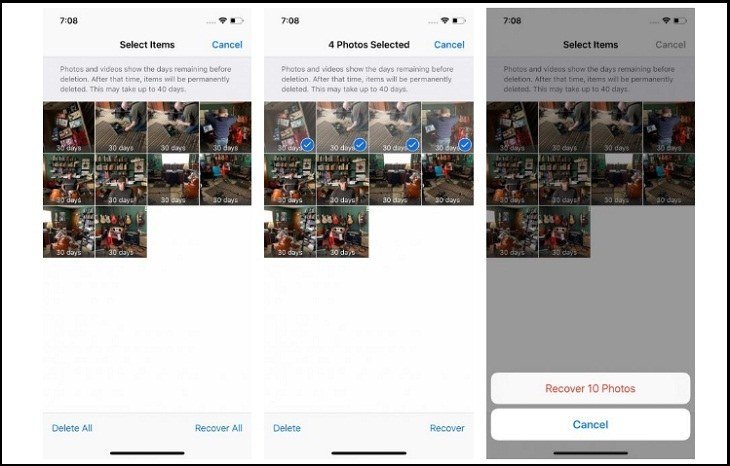
On iPhone: open Photos, scroll to Utilities, tap Recently Deleted. Your deleted photos sit here for 30 days before permanent erasure. Select what you want, tap Recover, and they’re back exactly where they were. On Android: open Google Photos, tap Library > Trash — same 30-day window, same one-tap recovery.
This resolves the large majority of cases, because most ‘deleted’ photos were deleted recently and casually. Check both the phone’s gallery trash and the cloud trash — they can differ. If the photos aren’t there, don’t panic yet; it just means we move to backups. And once you’ve recovered them, set up How do I back up my photos to the cloud for free so this scare never repeats.
Method 2: Cloud and Computer Backups You Forgot About
Think about every backup that might exist: iCloud Photos, Google Photos, Amazon Photos, OneDrive, Dropbox — check each one’s trash and archive, not just the main library. Photos sometimes survive in the cloud even after being deleted from the phone, depending on sync timing. Also check old phones and tablets signed into the same accounts; a photo deleted from your phone may still sit on an iPad that hasn’t synced.
Don’t forget computer backups: iTunes/Finder backups of iPhones and any manual photo imports to a PC or Mac. Search the computer for image files by date — I’ve found ‘lost’ vacation photos sitting in a Downloads folder from a transfer two years ago. Be thorough before spending money on anything.
Recovery triage, in order:
- Check Recently Deleted / Trash on the phone — 30-day window, one-tap recovery.
- Check every cloud service’s trash and archive, plus old devices on the same account.
- Search computer backups and old manual transfers by date.
- Last resort: recovery software with a free preview — stop using the phone first.
- Then set up automatic cloud backup so this never happens again.
Method 3: Recovery Software (Temper Your Expectations)
If the photos are truly gone from trash and backups, recovery software is the last resort. Tools like DiskDigger (Android) or Dr.Fone claim to scan storage for deleted files. The honest truth: on modern phones with encrypted storage, success rates are low — often under 30% — and ‘recovered’ photos are frequently partial or corrupted thumbnails.
If you try it anyway: stop using the phone immediately (new data overwrites the deleted files’ storage space), use a reputable tool with a free scan preview, and never pay before seeing what it actually found. For SD-card photos on Android, recovery odds are much better — remove the card, scan it on a computer with free software like PhotoRec, and you might get most of them back.
When They’re Really Gone (and Preventing Next Time)
Sometimes the answer is that the photos are unrecoverable — no trash, no backup, overwritten storage. It stings, but accept it rather than paying shady ‘data recovery’ services hundreds of dollars for a miracle they can’t deliver. Professional forensic recovery exists but costs $300+ and still fails on encrypted modern phones.
Then make it the last time: turn on automatic cloud backup today (ten minutes, free tiers available), and for truly irreplaceable photos, keep a second copy on an external drive or second cloud service. The 3-2-1 rule — three copies, two media types, one offsite — sounds paranoid until the day it saves you. Future-you will thank present-you.
The Bottom Line
How Can I Recover Deleted Photos From My Phone? What Most People Get Wrong
The biggest mistake is panicking and installing the first ‘photo recovery’ app that appears in an ad. Many of these are scams or malware — they demand payment before showing results, harvest your data, or install junk on your phone. Legitimate recovery starts with the built-in trash folders and your cloud backups, not with a sketchy app. If an app promises to recover photos from a modern encrypted phone with one tap, it’s lying; the technology doesn’t work that way.
People also misunderstand the 30-day window: it applies separately to the phone’s trash and each cloud service’s trash, and the clocks start at different times. A photo deleted from your phone two weeks ago might have been deleted from Google Photos’ trash yesterday — check everywhere independently. And turn off auto-delete behaviors while recovering: some ‘storage optimizer’ features permanently delete trash contents early, destroying the very safety net you’re relying on.
If your photos are on an SD card (common on Android), recovery odds jump dramatically — remove the card immediately, stop using it, and scan it on a computer with free tools like PhotoRec or DiskDigger’s desktop version. SD cards lack the encryption and wear-leveling complications of internal storage, so deleted files often remain recoverable for weeks. This is also an argument for keeping precious photos on the SD card rather than internal storage if your phone supports it: recoverability is a feature, and internal storage doesn’t have it.
Most deleted photos are sitting in Recently Deleted waiting for one tap — check there first, then comb through cloud backups and old devices. Recovery software is a long shot on modern encrypted phones. And whatever the outcome, turn on automatic cloud backup today: it’s the difference between a scare and a tragedy.
Photo recovery is a calm, methodical process: trash folders first, cloud backups second, old devices third, software last resort. Most cases resolve at step one. And whatever happens, let this be the scare that finally gets automatic cloud backup turned on — future-you will never have this panic again.