
How Do I Delete My Search History on All My Devices?

How do I delete my search history on all my devices? Maybe you’re gift-shopping, maybe you’re privacy-conscious, or maybe you just don’t love the idea of a permanent record of every curious 2am question. Whatever the reason, wiping search history across phone, tablet, and computer takes about ten minutes once you know where it all lives.
The tricky part: your search history isn’t in one place — it’s scattered across Google, your browsers, and your devices. Here’s every location and how to clear each.
How Do I Delete My Search History on All My Devices? Start With Google
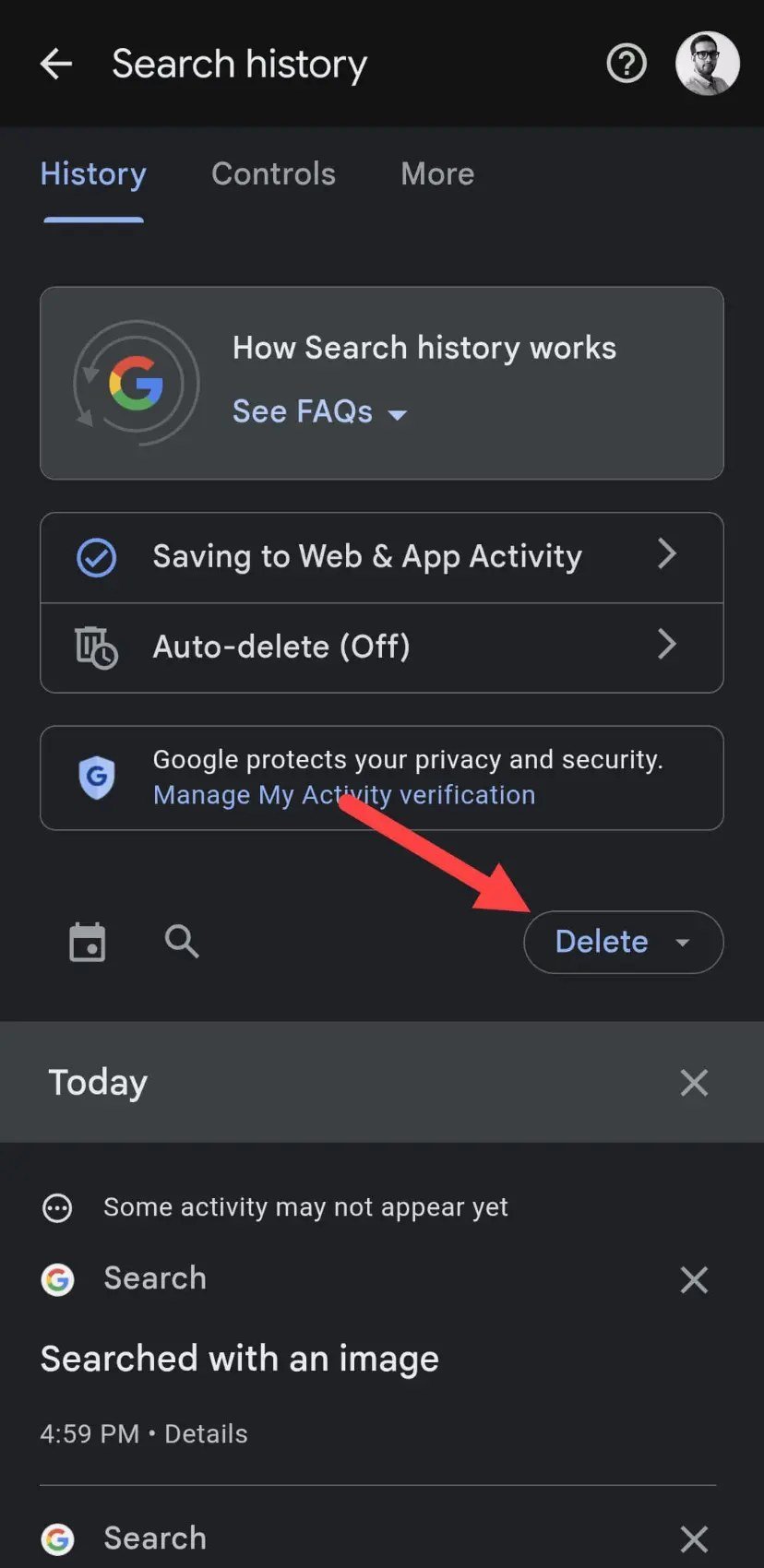
Google holds the master copy for most people. Go to myactivity.google.com (sign in), and you’ll see everything: searches, YouTube watches, location history. Click ‘Delete’ and choose a range — last hour, last day, all time, or a custom range. Deleting here removes it from Google’s servers, which covers all devices signed into that account at once.
Better than periodic purges: set auto-delete. In the same activity controls, set Web & App Activity to auto-delete after 3, 18, or 36 months. This is the ‘set it and forget it’ privacy win — your history quietly expires instead of accumulating forever. Also consider pausing the collection entirely if you’d rather Google didn’t build the record in the first place. Google’s own help pages at Google's official support guides walk through every toggle.
Browsers: Chrome, Safari, Edge, Firefox
Each browser keeps its own local history too. Chrome: History > Clear browsing data > choose time range (browsing history, cookies, cached images). Do this on each device, or enable Chrome sync so clearing on one clears everywhere. Safari (iPhone/Mac): Settings > Safari > Clear History and Website Data — or in Safari itself, History > Clear History.
The nuclear browsing option: use private/incognito mode for sensitive searches going forward — nothing is saved locally in the first place. It’s not anonymity (your ISP and employer can still see traffic), but it solves the ‘someone picks up my phone’ problem completely. For the location-tracking side of privacy, our How do I stop apps from tracking my location on iPhone iPhone guide covers the other half of the equation.
YouTube, Maps, and the Forgotten Histories
People forget the satellite histories: YouTube watch and search history (youtube.com > History > Clear), Google Maps timeline (a detailed map of everywhere you’ve been — review it at google.com/maps/timeline and delete or pause it), and voice assistant recordings (Google Assistant and Siri both store voice clips; delete via their privacy settings).
Social apps keep their own search records too: Instagram (Settings > Your activity > Recent searches > Clear all), TikTok, Facebook — each has a clear-searches option buried in settings. Do a twice-yearly sweep of these; they accumulate silently and most people never look. Ten minutes, twice a year, and the forgotten histories stop growing.
The complete wipe checklist:
- Google: myactivity.google.com > Delete (choose range); then set auto-delete to 3 months.
- Browsers: clear history on each device, or enable sync and clear once.
- YouTube, Maps timeline, voice recordings: clear each; pause future collection.
- Instagram, TikTok, Facebook: clear in-app search histories.
- Going forward: private mode for sensitive searches, auto-delete always on.
Stopping It From Being Saved Going Forward
Deletion is cleanup; prevention is the real fix. Turn on auto-delete for Google activity (3 months is the sweet spot for most people). Use your browser’s private mode for one-off sensitive searches. Consider switching your default search engine to one that doesn’t profile you — DuckDuckGo is the easy switch, and it’s genuinely good enough for 95% of searches now.
For the committed: review app permissions for search and location (see How do I stop apps from tracking my location on iPhone), use a VPN on public networks, and remember the fundamental trade — free services monetize data, so every ‘personalized’ convenience has a history behind it. Decide consciously where your line is, set the auto-deletes, and stop thinking about it.
The Bottom Line
How Do I Delete My Search History on All My Devices? The Fine Print
The fine print nobody reads: deleting your Google activity removes it from your account view and Google’s ad personalization, but Google retains some anonymized and aggregated data per its retention policies — ‘delete’ means deleted from your accessible history and most processing, not necessarily every backup tape. It’s still absolutely worth doing, but understand it’s privacy improvement, not time travel. The same applies to most ‘delete my data’ requests across the industry.
Also: your search history exists in more places than you think. Your ISP sees your traffic (unless you use HTTPS everywhere, which is now standard, plus optionally a VPN), your employer sees work-device activity regardless of your deletions, and individual websites keep their own logs. True search privacy requires layers: auto-delete for the account history, private browsing for sensitive queries, and awareness of who’s watching each network. Deleting history is one layer of a sensible privacy posture, not the whole thing.
Consider switching your default search engine as the deeper fix — DuckDuckGo or Brave Search don’t build personal search profiles at all, which means there’s simply less history to delete. The search quality gap has narrowed to the point where most people can’t tell the difference for everyday queries; you’ll only miss Google for the most obscure technical searches. It’s the difference between mopping the floor daily and fixing the leak — less history created means less history to manage.
Your search history lives in Google’s activity controls, each browser, and a handful of app-specific histories — clearing all of them takes ten minutes. Then set auto-delete and use private mode going forward so you’re maintaining, not purging. Privacy isn’t a one-time wipe; it’s the auto-delete setting you turn on once.
Clear the histories, set auto-delete, use private mode for sensitive searches — and understand the limits. Privacy is a practice with layers, not a button. The ten-minute cleanup plus auto-delete habit covers what most people actually care about: no permanent, casual record of every curious question.