
How Much Storage Do I Really Need on a Phone for Everyday Use?

How much storage do I really need on a phone for everyday use? Phone makers would love you to buy the 512GB model, but most people are paying for space they’ll never touch. The honest answer for the average person in 2026: 128GB is the sweet spot, 256GB is comfortable headroom, and anything more is for specialists.
I’ve tracked my own usage across three phones. I take a lot of photos, keep offline playlists, and install more apps than I admit — and I’ve never crossed 110GB. Here’s how to figure out your number instead of guessing at the checkout counter.
How Much Storage Do I Really Need on a Phone? Do the Real Math
Start with what you can’t change: the operating system and preinstalled apps eat 15–25GB on day one. A ‘128GB’ phone really gives you about 105GB. Then add your actual usage: apps average 200MB–2GB each (games are the hogs at 2–10GB), photos run 3–5MB each, and a minute of 4K video is about 400MB.
Light users (calls, messaging, social media, some photos): 60–80GB total — 128GB is plenty. Average users (lots of photos, music, a dozen apps, some video): 90–140GB — 128GB works, 256GB is worry-free. Heavy users (4K video creators, offline everything, big games): 200GB+ — get 256GB or 512GB. Be honest about which one you are; most people are lighter users than they think.
The Photo and Video Reality Check
Photos are the silent storage killer because they accumulate forever. At 4MB per photo, 10,000 photos is 40GB — and plenty of people have that many. But here’s the thing: with cloud backup (iCloud, Google Photos), those photos don’t need to live on your phone. Enable ‘optimize storage’ and your phone keeps thumbnails locally, pulling full versions on demand.
Video is different — a single 10-minute 4K clip is 4GB, and creators feel that fast. If you shoot lots of video, either budget 256GB+ or get disciplined about offloading footage regularly. For everyone else, photos in the cloud plus 128GB local is genuinely enough. Our walkthrough of How do I back up my photos to the cloud for free shows how to set up free cloud backup so local storage stops being the bottleneck.
Can You Expand Storage Later? (Usually Not)
This is the catch that makes the decision matter: most modern phones have no microSD slot. iPhones never did; Samsung killed it on flagships; only some budget and mid-range Androids still offer it. What you buy is what you get for the life of the phone.
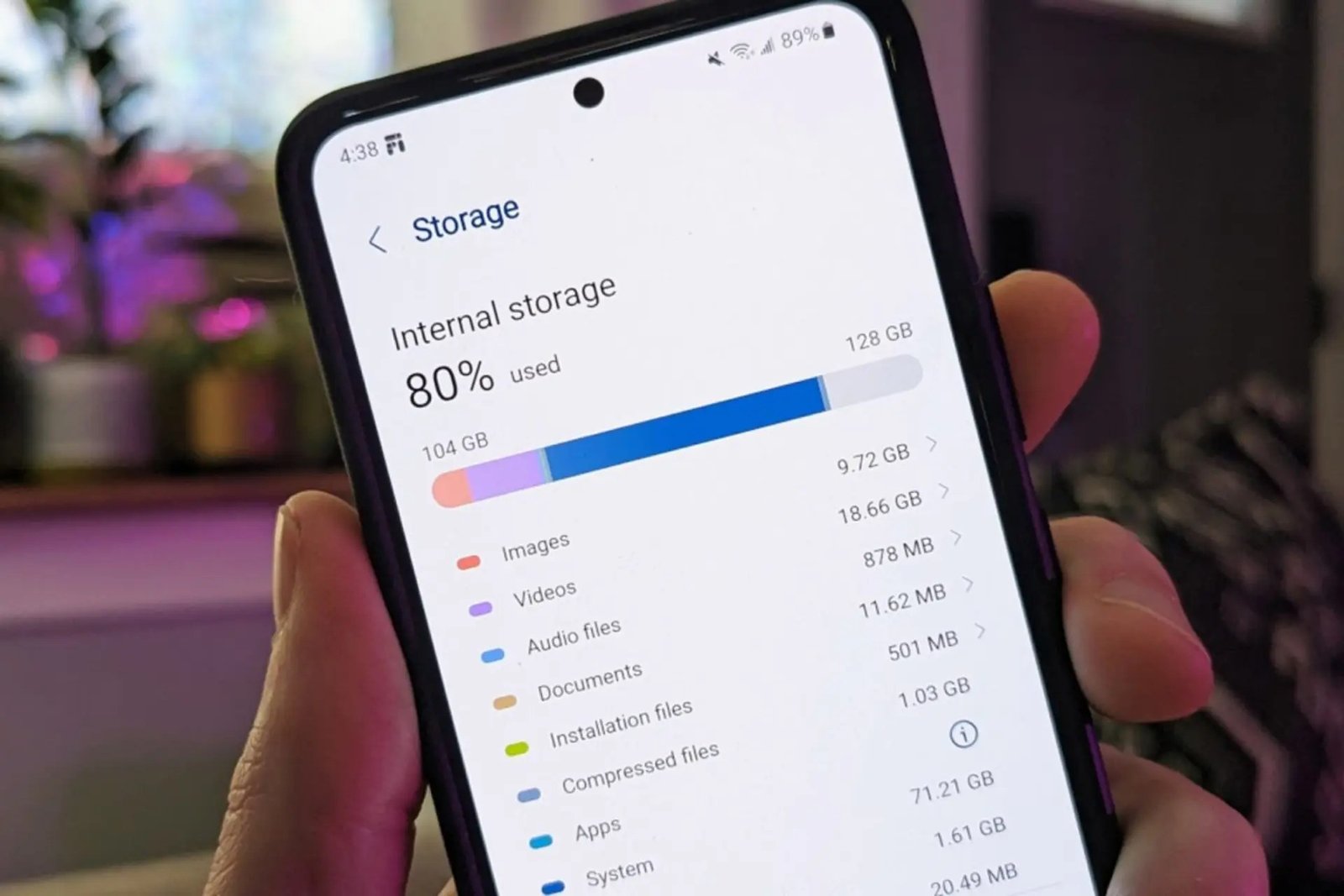
That permanence pushes some buyers to overbuy ‘just in case.’ Resist it unless you have a concrete reason — the $100+ jump from 128GB to 256GB is pure profit for the manufacturer if you never fill it. Instead, check your current phone’s actual usage (Settings > Storage) before buying. Your current usage plus 30% headroom is a better guide than any salesperson. And if space is tight right now rather than at purchase time, How do I free up phone storage without deleting my photos can buy you breathing room without a new phone.
Before you pay extra for storage, try these:
- Check your current usage under Settings > Storage — that’s your baseline, not a guess.
- Enable cloud photo backup with ‘optimize storage’ to shrink the photo footprint.
- Offload unused apps (iPhone does this automatically) instead of deleting them.
- Clear downloaded podcasts, offline maps, and old message attachments — the hidden hogs.
- Remember: no microSD slot on most flagships means the decision is permanent.
128GB vs 256GB: The Decision Framework
Buy 128GB if: you use cloud photo backup, stream music and video rather than downloading, play casual games, and upgrade every 2–3 years. This describes the large majority of buyers, and you’ll save $100+.
Buy 256GB if: you shoot lots of 4K video, download entire seasons for flights, play several large games simultaneously, or keep phones for 4–5 years (usage always grows). Buy 512GB+ only if you’re a professional creator or you genuinely know you’ll fill it — ‘peace of mind’ at that price is expensive peace.
One more consideration: resale. Higher-storage models hold value slightly better, but rarely enough to cover the upfront premium. Buy for your use, not the next owner’s.
The Bottom Line
How Much Storage Do I Really Need on a Phone for Everyday Use? Before You Decide
One factor buyers forget: how long you’ll keep the phone. App sizes grow relentlessly — the average app is roughly twice the size it was four years ago, and OS updates get heavier too. A 128GB phone that’s comfortable today gets tighter every year. If you upgrade every two years, buy for today plus a little; if you keep phones for four or five years, add 50% headroom to your current usage. The storage decision is really a time-horizon decision.
Also consider the hidden storage tax of modern messaging: WhatsApp, Telegram, and iMessage accumulate gigabytes of videos and photos that don’t show up in your photo library counts. Check Settings > Storage > Messages before buying — some people discover 20GB hiding there. And remember that ‘system data’ grows over time and can’t be cleaned easily; leaving 15–20GB of permanent headroom isn’t waste, it’s the cost of a phone that still works well in year three.
When you do upgrade, sell or trade in the old phone properly — a phone with 128GB in good condition still has real resale value that offsets the new purchase. Wipe it via factory reset, remove it from your accounts (especially Find My iPhone / Google Find My Device, which can brick resale if left active), and compare trade-in offers against private sale prices; private sales typically net 20–30% more. That recovered value effectively discounts whatever storage tier you choose next, making the ‘right’ size cheaper than it looks.
Most everyday users are perfectly happy with 128GB plus cloud photo backup; 256GB is the worry-free pick for heavy users and long keepers. Check your actual current usage, add headroom, and don’t let the upsell win. Storage you never fill is just money you gave the phone company for fun.
Check your actual usage today, add headroom for how long you’ll keep the phone, and don’t pay the $100+ premium for storage you’ll never fill. For most people that’s 128GB with cloud backup; for long-keepers and creators it’s 256GB. It’s a math problem, not a status decision — do the math and the answer is obvious.